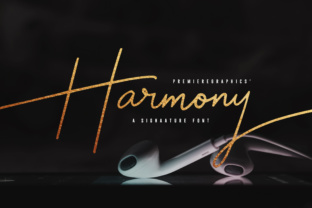
Harmony Script: A Versatile Font for Creative Expression
Harmony Script is a handy script font that brings a unique blend of elegance and approachability to any design project. Its signature style makes it an excellent choice for those looking to add a personal touch to their work. Whether you're designing a blog, creating wedding invitations, or working on graphic designs, Harmony Script offers a way to express creativity with ease.
What Is Harmony Script?
Harmony Script is a beautifully crafted script font designed to mimic the fluidity and grace of handwritten text. It features soft curves, balanced spacing, and a clean aesthetic that works well in both digital and print formats. This font is particularly useful for designers who want to convey a sense of warmth and personality in their projects without sacrificing readability.
Real-World Uses of Harmony Script
The versatility of Harmony Script allows it to be used across various industries and scenarios. Here are some common situations where this font shines:
- Blogs and Websites: Adding Harmony Script to headlines or call-out sections can make your content stand out. It adds visual interest while maintaining a professional tone.
- Photography: When creating photo captions or titles, using Harmony Script gives your images a more artistic flair. It’s especially effective for lifestyle or fashion photography.
- Wedding Invitations: The romantic and elegant feel of Harmony Script makes it perfect for wedding stationery. From save-the-dates to thank-you cards, it adds a touch of sophistication.
- Calligraphy and Art: Artists and calligraphers often use script fonts to create unique pieces. Harmony Script's flowing lines make it ideal for hand-lettering and custom artwork.
- Graphic Design: In branding, logos, and promotional materials, Harmony Script can help establish a distinctive identity. It works well for boutique brands or creative agencies looking to differentiate themselves.
Who Can Benefit from Harmony Script?
Harmony Script is not just for professional designers; it can also be a valuable tool for hobbyists and everyday users. Here's how different people might find it useful:
Bloggers and Content Creators: If you run a blog or social media page, Harmony Script can enhance your posts by making them more visually engaging. It's great for headings, quotes, and special announcements.
Event Planners: When designing event materials like programs, signage, or banners, Harmony Script adds a polished yet friendly appearance. It helps create a welcoming atmosphere for guests.
Students and Educators: Teachers can use this font to make classroom materials more appealing, while students might incorporate it into presentations or creative writing projects.
Freelancers and Entrepreneurs: Freelancers looking to build a personal brand or entrepreneurs launching a new business can use Harmony Script in their marketing collateral to communicate professionalism and creativity.
Considerations Before Using Harmony Script
While Harmony Script is highly versatile, there are a few things to keep in mind before incorporating it into your design:
- Readability: Although it has a beautiful flow, script fonts can sometimes be harder to read at smaller sizes. Ensure that the text remains legible, especially if it's meant for a wide audience.
- Legibility on Digital Screens: Depending on the screen resolution, some script fonts may appear less clear. Test your design on different devices to ensure it looks good everywhere.
- Font Pairing: To maintain balance in your design, pair Harmony Script with a sans-serif font for body text. This combination ensures clarity and visual harmony.
- Licensing: Always check the licensing terms for Harmony Script to make sure it's appropriate for your intended use, whether personal or commercial.
Practical Examples of Harmony Script in Action
Imagine you're designing a birthday card for a friend. Instead of using a standard font, you opt for Harmony Script to write the message inside. The result feels more personal and heartfelt, making the card stand out from the rest.
Another example could be a small café owner who wants to update their menu. By using Harmony Script for the headings and a clean sans-serif font for the food descriptions, they create a menu that feels both inviting and easy to navigate.
If you're running a photography portfolio site, adding Harmony Script to your gallery titles can give your work a more artistic and curated look. It subtly communicates your passion and dedication to your craft.
Limitations and Alternatives
No font is perfect for every situation. While Harmony Script is excellent for many uses, it may not be the best choice for formal documents or technical reports where clarity and uniformity are crucial. In such cases, a more structured sans-serif or serif font would be more appropriate.
If you're looking for alternatives, consider other script fonts like Brush Script MT, Garamond Premier Pro, or Playfair Display. These offer similar elegance but may have slightly different characteristics that suit specific projects better.
Ultimately, the key is to choose a font that aligns with your overall design goals and audience expectations. Harmony Script is a fantastic option for those seeking a balance between beauty and functionality in their creative work.