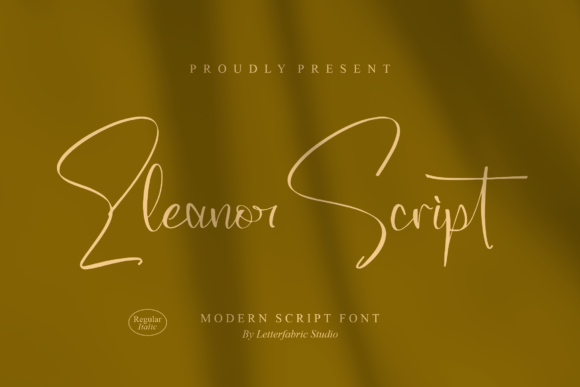
Eleanor Script: A Versatile Handwritten Font for Creative and Professional Use
Eleanor Script is an enchanting handwritten font that brings a touch of elegance and personality to any design project. Its flowing, cursive style mimics the natural movement of handwriting, making it ideal for a wide range of applications. Whether you're crafting a greeting card, designing a website header, or creating marketing materials, Eleanor Script can add a romantic feel and a personal touch that sets your work apart.
Understanding Eleanor Script and Its Role in Design Workflows
At its core, Eleanor Script is a script font that emulates the look of handwritten text. Unlike more rigid typefaces, it has a fluidity and organic feel that makes it perfect for projects where a personal or artistic touch is desired. This font is particularly useful in situations where the goal is to evoke emotion, create a sense of intimacy, or convey a message with warmth and character.
When integrating Eleanor Script into your workflow, consider how it fits within the broader context of your design process. It's not just about choosing a font—it's about understanding when and where to use it effectively. For instance, in branding projects, Eleanor Script can be used for logos or taglines that need to feel approachable and unique. In editorial design, it might be used for headlines or pull quotes to draw attention and create visual interest.
Practical Applications of Eleanor Script in Various Projects
The versatility of Eleanor Script means it can be used across multiple platforms and mediums. Here are some practical examples of how this font can be applied in different contexts:
- Greeting Cards and Invitations: Eleanor Script adds a romantic and personalized feel to invitations, thank-you cards, and birthday greetings. It's especially popular for weddings and special occasions where the handwritten aesthetic enhances the sentiment behind the message.
- Headlines and Web Design: On websites, Eleanor Script can be used for headlines or call-to-action buttons to capture attention and create a memorable visual impact. However, it's important to ensure readability by pairing it with a complementary sans-serif font for body text.
- Marketing Materials: Brochures, flyers, and social media graphics benefit from Eleanor Script’s charm. It can be used to highlight key messages or brand slogans, making them stand out in a crowded digital landscape.
- Print and Packaging: Product packaging, book covers, and promotional items often use script fonts to convey a sense of craftsmanship and authenticity. Eleanor Script can be a great choice for these purposes, adding a unique visual element to your product.
Each of these applications requires careful consideration of typography best practices. For example, using Eleanor Script on a website may require adjusting line spacing or font size to maintain legibility, especially on mobile devices. Similarly, when printing, ensuring that the font renders well at different sizes and resolutions is crucial for maintaining quality.
Integrating Eleanor Script Into Your Workflow
Integrating Eleanor Script into your workflow involves more than just selecting the font—consider how it interacts with other design elements, tools, and resources. Here are some practical tips for incorporating Eleanor Script smoothly into your projects:
- Pair with Complementary Fonts: To maintain balance and readability, pair Eleanor Script with a clean, sans-serif font for body text. This contrast helps guide the reader’s eye and prevents visual fatigue.
- Use in Layers: When working in graphic design software like Adobe Illustrator or Photoshop, use layers to separate Eleanor Script from other design elements. This allows for easier editing and adjustments without affecting the rest of the layout.
- Test Across Devices: Always test your designs on different screen sizes and resolutions to ensure that Eleanor Script remains legible and visually appealing. This is especially important for web-based projects where users may view content on various devices.
- Consider Licensing: Before using Eleanor Script in commercial projects, make sure you have the appropriate license. Some fonts come with restrictions on their use, so it's essential to review the licensing agreement carefully.
By following these guidelines, you can ensure that Eleanor Script enhances your design rather than detracting from it. The key is to understand how this font interacts with other elements in your composition and to use it thoughtfully and purposefully.
Workflow Integration and Long-Term Use
For professionals who frequently use Eleanor Script in their work, it's worth considering how to streamline its integration into long-term workflows. One approach is to create a standard template that includes Eleanor Script as a default font for specific types of projects. This can save time and ensure consistency across multiple outputs.
Additionally, organizing your font library and categorizing Eleanor Script based on use cases (e.g., print, web, social media) can help you quickly locate and apply it when needed. Many design tools allow you to create custom font folders or presets, which can be particularly useful for those who work on multiple projects simultaneously.
It's also beneficial to keep track of how Eleanor Script performs in different environments. For example, if you notice that it doesn't render well at smaller sizes on a particular platform, you may want to adjust your design accordingly or choose an alternative font for that specific use case.
Final Thoughts on Using Eleanor Script Effectively
Eleanor Script is more than just a beautiful font—it's a powerful design tool that can enhance the visual appeal and emotional impact of your work. By understanding its strengths and limitations, you can integrate it seamlessly into your creative and professional processes.
Whether you're a designer, marketer, educator, or hobbyist, Eleanor Script offers a unique way to express creativity and connect with your audience. As you continue to explore its potential, remember to experiment, refine your approach, and always prioritize clarity and usability in your designs.